
Your facilities lead just signed a lease. Your CIO wants downtime close to zero. Your team is still supporting users, replacing laptops, and cleaning up old hardware that should’ve left the building a year ago. That’s the starting point for most movers office relocation projects.
The mistake is treating the move like a furniture problem. It isn’t. It’s a coordinated handoff of people, equipment, data, vendors, building access, and liability. The desks matter, but the higher-risk work sits around network cutovers, retired devices, chain of custody, and the hardware nobody wants to claim once the packing starts.
The Strategic Foundation of Your Office Move
Most office moves fail before the first cart rolls onto the elevator. They fail in planning. Research on relocation operations identifies six recurring failure points: lack of adequate preparation, failure to create moving timelines with key milestones, failure to obtain senior management support, loss of control over process or personnel, insufficient understanding of unique organizational dynamics, and failure to engage outside resources early, as outlined in this business relocation risk guide.
Treat the move like a risk program
If you’re running IT or facilities, your first job isn’t picking boxes or assigning seats. It’s defining ownership. Someone has to control the move scope, the vendor scope, and the exception list. If that doesn’t happen, the move turns into a stream of side decisions made by whoever answers email fastest.
A useful starting point is a formal vendor review. This vendor due diligence checklist helps teams pressure-test insurance, documentation standards, handling procedures, and escalation paths before contracts lock in weak assumptions.
Practical rule: If a vendor can’t explain how they document custody, access, and exceptions, they’re not ready for your move.
Security starts before move day
Building access also deserves more attention than is typically given. Temporary staff, elevator reservations, after-hours entry, and visitor coordination all create friction. In mixed-use properties or campuses with shared entry points, tools built around Secure entry for multi-family are useful reference points for how controlled access and credential workflows can reduce confusion during a high-traffic transition.
What works is simple. Put one cross-functional lead in charge. Give IT authority over technology handling. Give facilities authority over physical sequencing. Require legal or procurement review for any vendor touching serialized equipment or storage media.
What doesn’t work is splitting the move into “office stuff” and “IT stuff” as if they can be scheduled separately. They can’t. The moment your movers touch a workstation, printer, rack component, or retired laptop pile, the relocation becomes an IT asset management event.
Building Your Relocation Timeline and Master Checklist
Planning windows need to match the size of the move. Office relocation timelines commonly scale from 3 to 4 months for small offices with 10 to 25 employees, 6 months for medium offices with 50 to 100 employees, and 9 to 12 months for large offices with 100 or more employees, according to Move Solutions project management guidance.
A visual timeline helps align departments before details start drifting.
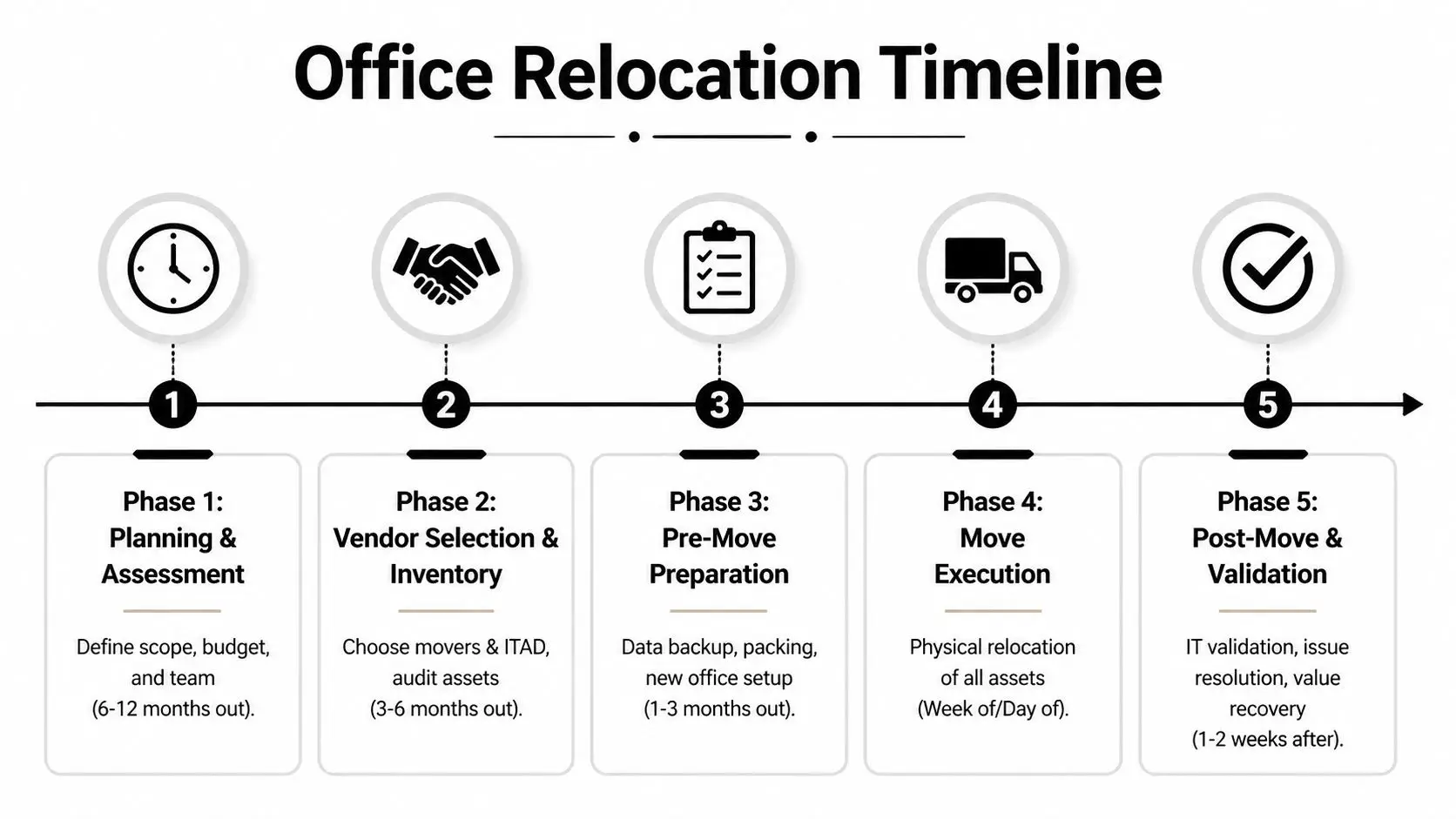
Nine to twelve months out
Large moves need early structure. Start with a full asset inventory that separates four buckets:
- Stay in service items that will move and reconnect
- Replace at destination items that aren’t worth moving
- Retire before move assets that should be wiped, shredded, or recycled
- Unknown ownership equipment that needs lease, finance, or department review
At this stage, lock the new floor plan against power, network drops, printer placement, rack rooms, and receiving routes. If your office includes server rooms, IDF closets, medical devices, or lab gear, sequence those separately from furniture. They won’t tolerate improvisation.
Six months out
Midpoint planning is where teams either get disciplined or get exposed. Your mover and your IT disposition partner should both be engaged by now. The operational reason is straightforward. Surplus equipment blocks staging space, creates labeling confusion, and increases the odds that someone moves a device that should have been retired.
For teams that need a dedicated process for pre-move asset review, de-install coordination, and secure removal of non-deploying equipment, Beyond Surplus documents that workflow in its office relocation service.
Use this checkpoint to finalize:
- Department move sequence based on operational criticality
- Backup and cutover windows for systems that can’t fail over casually
- Asset tags and destination labels tied to the new floor plan
- Building rules covering dock use, elevators, parking, and after-hours access
- Exception approvals for leased devices, unsupported hardware, and special handling items
Don’t let “we’ll decide later” sit on anything with a serial number, a drive, or a lease obligation.
One to three months out
This is preparation, not planning. Every piece of ambiguity now becomes move-day labor.
A solid pre-move checklist includes:
| Focus area | What needs to happen |
|---|---|
| User devices | Confirm who keeps, swaps, or turns in each laptop, monitor, dock, and phone |
| Shared equipment | Assign owners for printers, conference room gear, scanners, and specialty devices |
| Infrastructure | Stage ISP readiness, rack delivery, switch installation, and patching plans |
| Surplus equipment | Remove retired devices before packing crews start mixing them with active inventory |
| Communications | Publish downtime windows, support contacts, and first-day procedures |
Week of the move
Freeze discretionary changes. Don’t upgrade conference room systems, roll out new printers, or let departments swap locations because someone wants better natural light. During the final week, simplicity beats elegance.
Move-day success depends on discipline in a few narrow areas:
- Pack by destination, not by origin
- Load IT separately from general furniture when possible
- Keep one live issue log
- Require signoff at handoff points
- Protect staging rooms from walk-in dumping
If your move is smaller, compress the timeline. Don’t compress the controls.
Selecting the Right Movers and ITAD Partners
A lot of vendor problems come from expecting one company to handle two very different jobs. A commercial mover is hired to de-install, transport, and place business assets. An ITAD partner is hired to manage retired electronics, data-bearing devices, compliance documentation, and downstream disposition. Some overlap exists, but the responsibilities aren’t interchangeable.

Why both vendor types matter
Office relocation demand is persistent. Approximately 2 to 5% of U.S. businesses relocate offices annually, and the corporate relocation service market is projected to reach $32.47 billion by 2032, based on data compiled in these office moving relocation statistics. That demand keeps the market busy, but volume doesn’t guarantee fit for your environment.
A standard mover can be excellent at panels, desks, file banks, and floor-by-floor sequencing while still being the wrong choice for drive destruction, serialized asset reconciliation, or certificate-based disposition.
How to evaluate a mover
Use practical screening criteria, not sales language.
Technology handling experience
Ask how they pack monitors, small-form-factor devices, printers, and rack equipment. Listen for procedure, not reassurance.Insurance and claim process
You need to know what happens when a switch arrives bent, a printer disappears, or a workstation lands in the wrong suite.Building logistics capability
Good movers ask about dock constraints, elevator reservations, protection requirements, and weekend labor. Weak ones ask only for square footage.Label discipline
If the mover doesn’t insist on a destination-based labeling scheme, expect rework.
For companies comparing provider capabilities in more detail, this overview of office relocation companies is useful because it frames the distinction between transport support and IT-focused removal work.
How to evaluate an ITAD partner
An ITAD partner should answer a different set of questions:
| Question | Why it matters |
|---|---|
| Can they provide chain-of-custody records? | You need defensible documentation for devices leaving service |
| Do they support on-site and off-site data destruction? | Different asset classes require different handling decisions |
| Can they separate reuse, recycling, and destruction streams? | That protects value where resale is appropriate and destroys what shouldn’t circulate |
| Do they issue certificates? | Documentation closes the loop on compliance and liability transfer |
| Can they coordinate pickups around move phases? | Timing matters when staging space is tight |
The wrong vendor says, “We handle electronics.” The right vendor tells you exactly how retired assets are logged, secured, destroyed, and documented.
The Playbook for Secure IT Asset Handling and Logistics
Most losses during a move don’t happen because someone steals a server. They happen because teams lose control of routine items. A dock goes missing. Five monitors land on the wrong floor. An unlabeled tote of drives sits in a conference room overnight because nobody owns it.
In these circumstances, a repeatable handling process matters more than general moving experience.

Start with the asset map
Before anything is unplugged, create an inventory that captures device type, user or department, serial number if applicable, physical condition, and destination status. Don’t rely on your CMDB alone. Office reality always includes exceptions such as loaners, spare monitors, test machines, and devices that were never entered cleanly.
Build the map around three movement types:
- Relocate and reconnect
- Relocate for temporary storage
- Retire from service
That distinction keeps active equipment from getting mixed into the disposal stream and keeps dead hardware from cluttering the new office.
Label for the new office, not the old one
Labels should point to destination room, floor, user, and reconnect priority. Origin-based labels create confusion because they tell crews where an item came from, not where it needs to go.
A workable label set usually includes:
- Color zone for floor or department
- Room code tied to the destination plan
- Asset class such as laptop, monitor, printer, network
- Priority flag for day-one deployment versus later setup
For security-sensitive spaces, it also helps to review physical placement and surveillance basics. Teams looking for broader reference material on camera placement and entry control can use Home AV Pros office security as a practical planning resource.
Pack sensitive equipment like it will be dropped once
That’s not cynicism. It’s good handling discipline.
Use anti-static protection for electronics, secure cables separately, and avoid mixing heavy accessories with fragile displays. Small peripherals should travel in sealed, labeled containers by workstation or room. For rack gear, document port states and front-rear orientation before removal. Photos help, but only when they’re tied to the asset record.
A reliable packing sequence looks like this:
Disconnect methodically
Power down, label cables, bag fasteners, and record dependencies.Protect surfaces and ports
Cover screens, cap exposed connectors where possible, and keep accessories from scraping equipment in transit.Separate by risk class
Servers, storage devices, executive laptops, and shared conference room kits shouldn’t ride as generic office contents.
When crews are moving fast, the safest item is the one that’s already documented, labeled, and packed for one obvious destination.
Control the handoffs
The chain of custody isn’t a legal phrase you pull out later. It’s the operating model for move day.
Every transfer point should be visible:
| Handoff point | Required control |
|---|---|
| Desk to staging | Count, tag verification, condition note |
| Staging to truck | Load confirmation by asset group |
| Truck to destination | Receiving check against manifest |
| Destination to deployment | User or department signoff |
| Retirement stream | Separate custody log and secure hold area |
Keep active assets and retired assets physically separated. Different colored labels and different staging areas help. So does assigning one person to own discrepancy resolution. If a device shows up in the wrong place, someone needs authority to stop the flow, fix the record, and move on.
Data Destruction and Compliant Disposal During the Move
The move is the best time to retire bad equipment because everything is already under review. It’s also the worst time to improvise disposal because crews are busy, space is tight, and old devices tend to pile up in unsecured corners.

Why this gap matters
One of the biggest blind spots in office move planning is what happens to decommissioned hardware. Data cited in this office relocation analysis states that 68% of office relocations involve retiring legacy hardware, and businesses facing improper e-waste disposal issues have seen fines averaging $250,000 when data remnants are left unaddressed in standard move plans, according to VGS Logistics.
That risk isn’t theoretical. During a move, old desktops, loose drives, printers with storage, retired networking gear, and abandoned test machines all become easier to mishandle.
Match the destruction method to the asset
You need a disposition rule set before move day. Not all assets should be treated the same.
- Physical shredding fits failed drives, highly sensitive media, and devices that shouldn’t re-enter circulation.
- Certified wiping makes sense for equipment with reuse or resale potential, provided the process is documented.
- Product destruction applies when branding, proprietary configurations, or controlled components create separate risk.
For teams building defensible sanitization procedures, the NIST SP 800-88 guidance page is a practical reference point for deciding how to clear, purge, or destroy data-bearing devices.
Documentation closes the loop
A disposal event isn’t complete when the truck leaves. It’s complete when you can show what left service, how it was processed, and what documentation was issued. That normally means certificates of data destruction, certificates of recycling, asset-level records when required, and internal approval trails.
The operational trade-off is simple:
| Approach | Likely result |
|---|---|
| Ad hoc disposal during cleanup | Faster in the moment, weak on proof and control |
| Scheduled ITAD workflow during the move | Slower to plan, stronger on compliance and liability transfer |
One provider option in this category is Beyond Surplus, which offers on-site or off-site shredding, certified wiping, pickup coordination, and certificates tied to IT asset disposition workflows. That’s the kind of scope you want evaluated before the first retired device hits a staging room.
If you can’t prove how a drive was handled, you don’t have a completed disposal process. You have an assumption.
Post-Move Validation and Value Recovery
A relocation isn’t finished when furniture is placed. It’s finished when systems work, inventory reconciles, and the surplus stream is closed without leaving value on the floor.
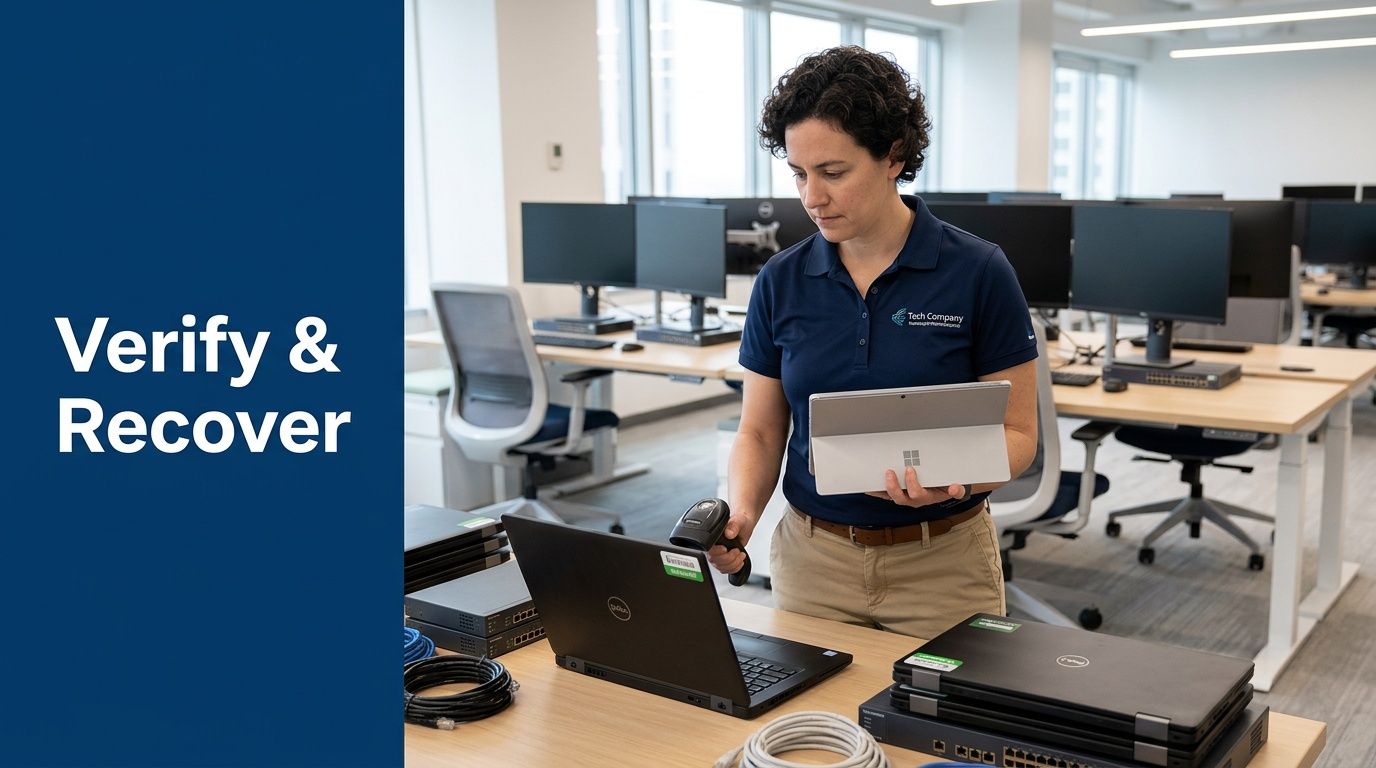
Validate before you declare success
The first business day should focus on verification, not celebration. Test network connectivity, conference rooms, printers, badge access dependencies, and any shared systems that users assume will just work. Then reconcile physical assets against the move manifest and exception list.
A short post-move audit should answer four questions:
- Did every planned asset arrive where it should?
- Did any retired assets get transported by mistake?
- Are unresolved damages documented and assigned?
- Has the surplus stream been picked up, processed, or scheduled?
Recover value instead of storing junk
Moves expose equipment that no longer belongs in production. That includes aging laptops, spare displays, legacy servers, docking stations, and networking gear that got replaced as part of the relocation. Many companies still stack those assets in storage because nobody owns the recovery process.
That’s expensive. Office move guidance from OfficeFinder notes that 40% of enterprises are unaware they can recover 20 to 30% of asset value via certified recycling, and that pairing movers with ITAD firms can cut overall costs by up to 25% through better coordination and recovery planning, as discussed in this office move cost and recovery article.
If your team wants a reference point for structured resale and disposition, this IT asset recovery in Georgia page shows how buyback and compliant downstream handling are typically organized.
For the physical workspace itself, post-move planning often includes better workstation layouts and storage choices. Teams refreshing executive offices or admin stations sometimes borrow ideas from broader smart home office solutions because the same principles apply. Cable control, storage discipline, and equipment placement reduce clutter and support better device handling.
Post-move value recovery does two things at once. It removes lingering risk, and it gives finance a cleaner answer to what the move cost.
Frequently Asked Questions on Office Relocation
How should we handle leased IT equipment during a move
Start with the lease schedule before anyone labels the device for transport or disposal. Confirm return terms, data sanitization requirements, and whether accessories must be included. Many leased assets require condition documentation and a specific return workflow. Treat them as their own asset class.
What’s the best way to communicate downtime to employees
Use one schedule, one owner, and one support channel. Publish what will be unavailable, when it will happen, what users must do before leaving the old site, and where to get help on day one. Keep the message operational. Employees don’t need relocation theory. They need clear instructions for laptops, phones, printers, meeting rooms, and login expectations.
Are lab, medical, or specialized devices different from standard office equipment
Yes. These devices often have calibration concerns, chain-of-custody issues, regulated data, or environmental handling requirements. Don’t put them into the same workflow as office monitors and docking stations. Assign a specialist, verify manufacturer handling guidance, and separate transport and receiving checks from the general move stream.
How do you run a phased multi-location move without losing control
Use repeatable waves. Freeze the process after the first phase long enough to review exceptions, labeling mistakes, damage patterns, and user issues. Then adjust before the next site or department moves. Large campus projects fail when teams assume the first wave was “close enough” and scale bad process across every later phase.
What should stay in-house and what should be outsourced
Keep decision-making, approvals, and exception handling in-house. Outsource heavy transport, secure destruction, and any work that depends on documented custody or compliance evidence. Your internal team should own the rules. Vendors should execute against them.
Contact Beyond Surplus for certified electronics recycling and secure IT asset disposal support during your next office relocation.